
6. Timelines
Days befor the race - Thursday
Contact local Red Bull
- Meet with the local responsible Red Bull team
- Tell them what you need, what has to be done before the race and what may concern them
- They should have received your equipment already if it hasn't arrived with you
Equipment check – Components
- Check if everything arrived completely
- You will find in every black box a checklist (pad-lock combination is 0805 or 805)
- Also check if there are any pieces or tools missing for the roof construction (detailed list here)
Equipment check – Functionality
- Check the functionality of the complete equipment with the corresponding checklist (in black box lid plastic foil)
- Note that GPS devices are only working outside of buildings
- For tests with the OBU always use the Test Mode
Check local SIM cards
- The local Red Bull team should provide you with two SIM cards of a local provider which are meant for the Catcher Cars OBUs TP-Links
- They should be used as backup SIM cards for internet connection if the roaming cards of our equipment are not working for any reason
Days Befor the race - Friday
Setup the Roof Constructions of the CC
- Setup the roof constructions of both Catcher Cars
- Here you can find a link to a detailed video for the setup of a roof construction of a Catcher Car
Test drive with driver of the Catcher Car
- The driver should get used to the required position (artificial horizon) and speed
- He will need a little time to get used to the way it works which is why there should be a test drive
Setting the kilometer marks
- Set the kilometer marks as it is described here
- Work very cautiously! It is very important that the markers on the track match with our timing system
- Also remember to check the internet connection on KM15 and KM44
- Take mobile devices with you for checking the connection on the track
Helpdesk for BIB handout
- One person from the timing team will be responsible for a helpdesk during the bib handout to edit participant information and help with the registrations
- There is a platform called RMS to do all those kind of changes
Days Befor the race - Saturday
Prepare the Catcher Cars
- Set up the roof construction completely if this has not happened yet
- Continue with the next steps of the Catcher Car setup as it is described
- Please don't leave the timing equipment (OBU, Minitrack, Flashpoints) in the car over night
Starting area
- Check the general starting area
- You need power to charge all devices as long as possible
Helpdesk for BIB handout
- One person from the timing team will be responsible for a helpdesk during the bib handout to edit participant information and help with the registrations
- There is a platform called RMS to do all those kind of changes
First time sync + check
- Synchronize the Chonotrack controllers with the OBU with the currents GPS time (Config Mode --> Synchronize times)
- Get in touch with Race Control to check if the time shown on the controllers and OBUs are equal to the time of the system of your supervisor
Global rehearsal
- Test run with the SAME setup as on raceday. Both Catcher Cars, leading bikes and also some runners with startnumbers will go some KM (about 5KM) as it will be on raceday
- Use TEST mode on the OBU
Race Day - Pre-Race
6h to start
- Final setup of Catcher Cars (start-up procedure) including check
- Use all devices just with external power
4h to start
- Start OBU with external power
- Fuel Catcher Cars if necessary
- First Timecheck with Race Control
2h to start
- Timer leaves helpdesk of bib handout
1.5h to start
- Time synchronization – DO NOT turn off the controllers once they are synchronized!
1h to start
- Hand out leader devices to the bikers
- Make sure that the app is already running and all necessary services are enabled before handing over the phones
- switch OBU into Race mode and select car position (main/backup)
30min to start
- Set up 15K line (guide)
- Check internet connection at this line
- All participants have to be in the starting area
15min to start
- Last time check with Race Control
- Prepare all DAU tablets for the countdown
- Timing team is responsible for the official time
-
Check if all batteries are fully charged (OBU, leader devices, controllers)
-
Take all batteries with you if battery change is necessary!
-
One hour before start: switch OBU into Race Mode and select car position (main/backup)
-
Tracking mobiles should be pre-set when you hand over to the bikers and tracking should already be turned on.
-
Did you make a time synch with every controller? -> current GPS time available?
During the race
11:00 UTC
- Start of athletes
- Make sure that the OBU time is used for the start countdown
- Bring Catcher Cars into driving position
11:30 UTC
- Start of Catcher Cars
- Starting speed 14 km/h
- Press GUN START at the Take-off of the Catcher Cars on the Minitracks in the CC
1h after CC start
- Setup 44K line
- Check Internet connection
- Catcher Car passes 15K line
- Press GUN START on the 15K line when Catcher Car passes 15K line (important)
2,5h after CC start
- Catcher Car passes 44K Line
- Press GUN START on the 44K line when Catcher Car passes 44K line (important)
End of Race
- After catching last running man/woman
- Go back to Race Camp
- Be careful with the roof construction – Caution with high speeds! Drive slowly.
Tasks while driving:
| Change batteries if necessary | |
| Press “Leading woman overtaken”, whenever leading woman was passed (on the OBU) | |
| Press “Leading man overtaken”, whenever leading man was passed (on the OBU) | |
| Press “Race over”, when the last person is caught (BIB of leader is shown on the OBU) |
- Please try to enter all race numbers of passed participants manually after 44K (won’t be that many). The system will prefer the RFID reads over your manual entries but if we miss some participant, we can use these manual times as a backup.
- On Race Day don’t take any bib numbers with you and keep them away from the Catcher Cars and the lines.
- If you notice any wrong bib read (e.g. you inadvertently took a bib with you into the Catcher Car) please immediately notify your supervisor so Race Control can delete the wrong number.
- Tell us the bib number of the winner – please tell us the number you have seen and not the number shown on the OBU.
- Get in touch by telephone or the OBU Chat to your supervisor if there are any concerns if necessary.
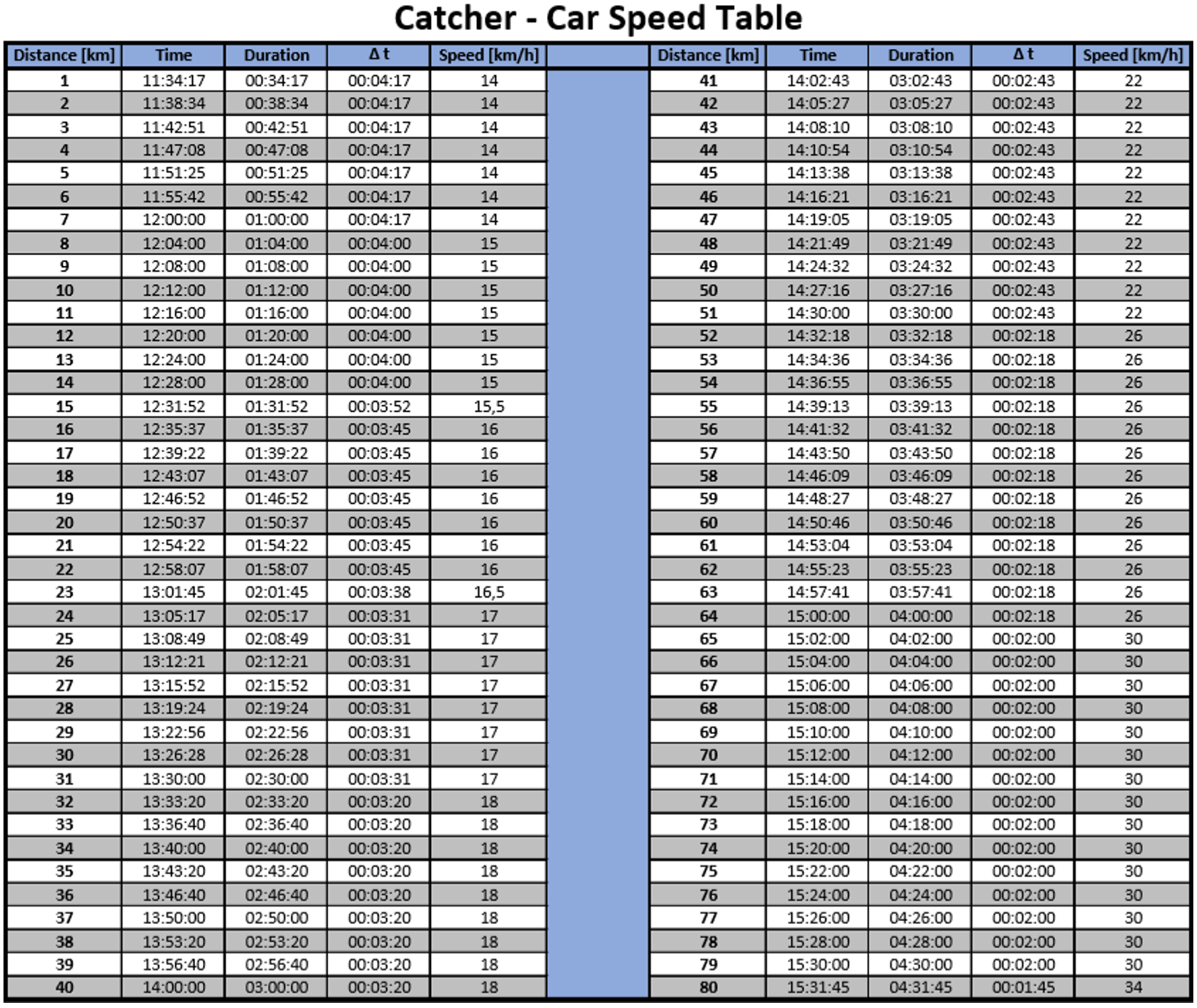
The following table shows the speed the Catcher Car should be going during the race and when the cars should be at which distance.
Use it if you have problems with the DAU, it is in the black boxes and should be intaken into the CCs.
After the Race
Backup OBU & Controller
- Backup OBU (see section
2.1.14)) - Backup controllers*
- Send the backups to the Race Control email address
Removal 15K-/40K-44K-Lines
- The 15K and
40K44K line can be disabled after the Catcher Car have passed, "GUN START" has been pressed and backups have been done
Removal Catcher Cars
- Disassemble setup – after backups of the OBU and the Minitrack have been done you can shut them down; always in agreement with Race Control!
Dismount Roof Construction
- Dismount roof construction – please make sure that everything is packed safely
Hand off Equipment
- After dismounting and packing hand over the equipment to the local Red Bull team
- Please make sure that everything is complete
- Take everything you brought back home with you
*Backup Minitrack:
Insert USB Drive > Menu > Tools > File Copy > All Files (Menu “3-2-2”)